Requesting Production Credentials for HIE Integration
🔑 Production Credentials Overview
Production credentials provide your healthcare facility with secure access to the Health Information Exchange (HIE), enabling your systems to connect with and consume live APIs in a production environment. These credentials are essential for establishing a trusted connection between your facility's systems and the HIE infrastructure, ensuring all data exchanges are properly authenticated, authorized, and secured according to healthcare industry standards.
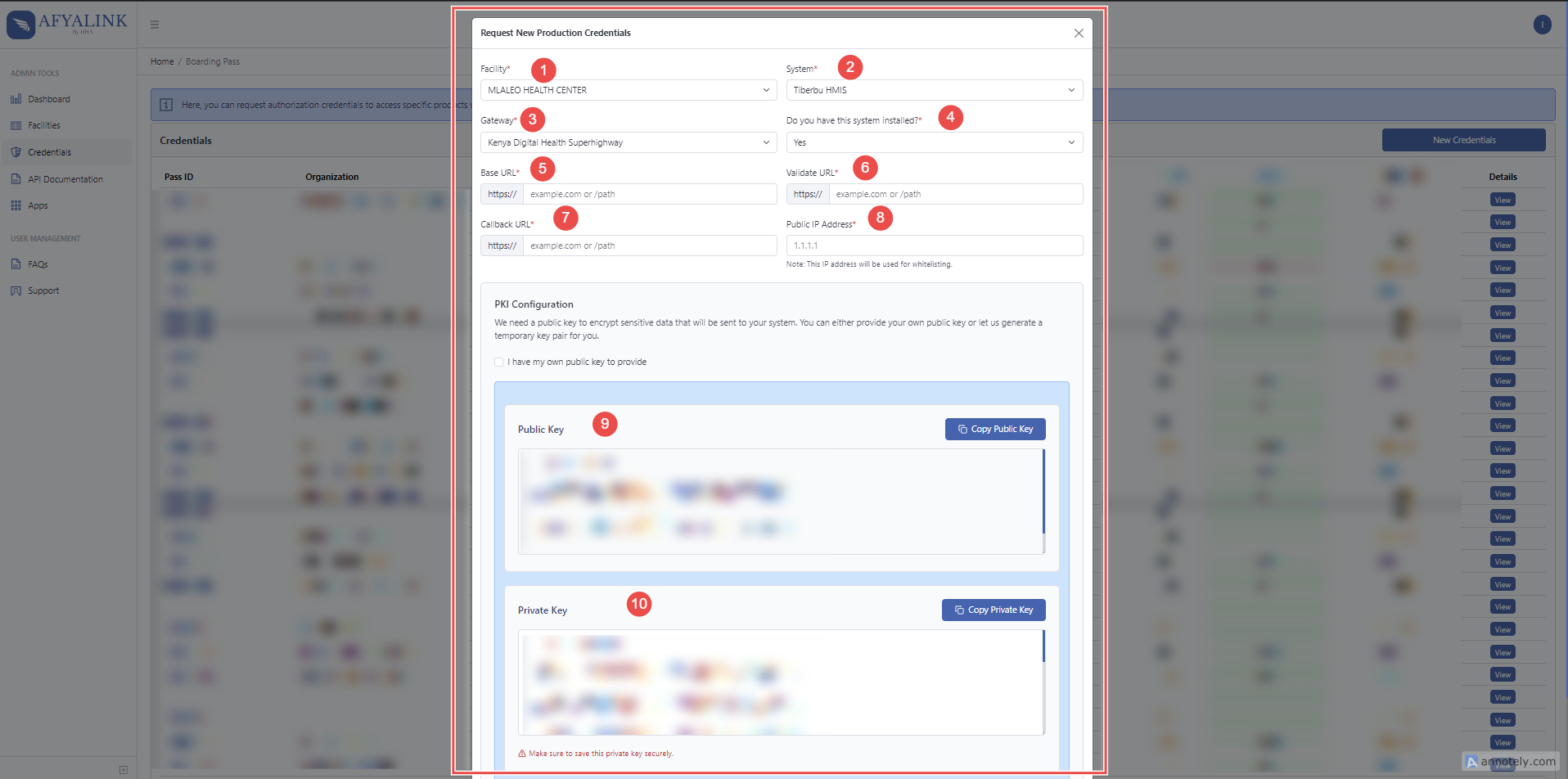
🪜 Detailed Process for Requesting Credentials
To request API credentials for production access, navigate to the Credentials Menu and select 'New credentials'. This will open a form that must be completed with specific information about your facility and integration needs. Follow the comprehensive guide below to ensure your credential request is processed successfully.
🏥 Step 1: Select Facility Name
- Choose your facility name from the dropdown menu provided
- This selection ensures your credentials are properly associated with your specific healthcare organization
- The system will only display facilities that your account has permission to manage

🖥️ Step 2: Choose the System
- Select the appropriate system you are integrating from the available options in the dropdown menu
- This identifies which of your facility's systems will be connecting to the HIE
- If your specific system is not listed in the dropdown options, please contact your administrator to have it added

🔗 Step 3: Select the Gateway
- From the dropdown menu, select "Kenya Digital SuperHighway" as your gateway
- This gateway serves as the connection point between your system and the national health information infrastructure
- The Kenya Digital SuperHighway is the standard gateway for healthcare integrations in this region.
-

⚙️ Step 4: Specify Installation Status
- Indicate the current implementation stage of your system by selecting the appropriate status
- This information helps administrators understand your readiness for integration
- The status you select will help determine the appropriate level of support and guidance during the integration process

🌐 Step 5: Provide Base URL
- Enter the Base URL of your production system or instance
- This URL serves as the primary endpoint for your system's API integration
- Ensure this URL is accessible from the HIE network and properly configured with appropriate security measures

🔄 Step 6: Provide Callback URL
- Input your system's Callback URL where the AfyaLink Portal | DHA will send responses or updates related to API transactions
- This endpoint will receive asynchronous notifications and results from the HIE
- Verify that this URL is properly configured to handle and process incoming data from the HIE

✅ Step 7: Provide Validation URL
- Enter the Validation URL that will be used for verifying and confirming requests between your system and AfyaLink
- This URL is critical for ensuring message integrity and authenticity during the integration process
- The validation process helps prevent unauthorized access and ensures data quality

🔑 Step 8: Upload Public Key
- Provide the public key of your system's certificate
- This key will be used to encrypt responses sent to you from the HIE
- You must retain your private key securely to decrypt these responses
- If you do not have a key pair (private and public keys), you can request these to be generated for you on the platform
- Important: Store your generated keys in a secure location, as the platform will not maintain copies of these keys once they are provided to you

🔑 Step 9: Generate Private Key and Save
-Generate a secure private key for your certificate and save it in a safe location. This key is essential for authentication and must be kept confidential

🚀 Step 10: Submit the Request
- After completing all required fields with accurate information, click the "Submit" button to finalize your credential request
- Your request will be reviewed and processed by the appropriate administrators
- Once approved, you will receive notification that your API credentials have been issued and are ready for use
- These credentials will enable your facility to begin integration with the production HIE environment